
Using the iPhone as a
Behind-the-
Scenes Tool
Show the Work, Not Just the Shot.
✓ Backed by a 30-day money-back guarantee — join with zero risk, cancel anytime.
Get this course plus 1,000+ others — new courses weekly — for $249 $199/year. That's about 54¢ a day, and $40 less than paying monthly.
Great work isn’t enough anymore.
Aundre shows you what is.
About the Course
Great photos alone don't get you noticed anymore. The photographers people follow and hire are the ones who share the story behind the shot, and Aundre Larrow does it with the iPhone in his pocket. A New York photographer and filmmaker who has shot for Walmart, WhatsApp, and The Washington Post, Aundre walks you through the camera features built for behind-the-scenes capture, from Dual Capture and the Action button to screen recording, plus the apps he uses to plan light, scout locations, and diagram setups. Whether you post for friends or pitch to brands, you'll learn to capture your process without slowing down the shoot and share it in a way that makes people care about the photo before they ever see it.
Why This Course Matters
Anyone can post a finished image. Almost no one shows how they got there.
That gap is where trust, followers, and opportunities are won. Aundre pulls back the curtain on real shoots, from a rain machine on a soundstage to an underwater session in a 10-foot pool, to prove that a few honest frames from your phone can turn one photo into a story people follow. Along the way, you'll build a habit most photographers skip: keeping a record of your light, settings, and inspiration so you can explain every choice, plan the next shoot faster, and make your way of seeing the reason people remember you.
Who's Teaching You
Learn from a photographer brands hire for the shot and the story behind it
Aundre Larrow built his career on the two things this course teaches: making the work and showing how it's made. He spent years shooting social and behind-the-scenes content for brands before directing his own films, and he still documents every project with the phone in his pocket. Here, he shows you exactly how.
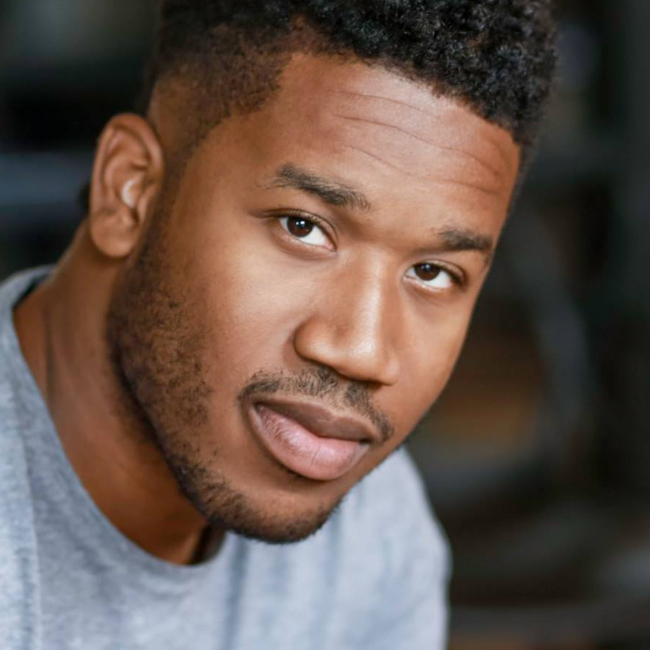
Aundre Larrow is a Brooklyn-based photographer, director, and educator with more than a decade of editorial and commercial work for brands like Apple, Google, Adidas, and Adobe, and features in The New York Times and Wired. A former Adobe Creative Resident, he got his start shooting social and behind-the-scenes content, and he teaches the way he works: phone in hand, showing every step.
What You'll Learn
Skills you'll use on every shoot
From the first frame on set to the mood board you share when it's done — here's what you'll walk away knowing how to do.
Capture on set without slowing down
Dual Capture, burst mode, the Action button, and hands-free recording from your AirPods or Apple Watch, so documenting never gets in the way of the shot.
Keep your footage consistent
Preserve Settings, locked exposure and white balance, and ProRAW and ProRes, so every clip matches from the first setup to the last.
Turn your editing into content
Screen recordings with the mic on and Lightroom's tap indicators that answer “what did you change?” before anyone has to ask.
Show where the light came from
Diagrams, 3D models, and quick notes that record every setup, plus the Sunseeker app for predicting the sun before you arrive.
Scout with the apps you already own
Location maps in Photos, lens previews in Artemis, and distances in Measure, all captured as screenshots you can share with clients.
Share how you think, not just what you made
Mood boards and saved inspiration that align clients with your vision and give followers a reason to care about the next post.
Try Before You Join
Watch a full lesson, free
No signup. No credit card. Press play.
That's one full lesson, free. The other six are ready when you are.
The Full Curriculum
7 lessons, start to finish
Just watched Lesson 2? Here's everything around it — tap any lesson to see what's covered.
Aundre shares how a single behind-the-scenes photo went viral and why sharing how you work now matters as much as the work itself — so start documenting today, not someday.
A rain machine on a soundstage, LED digital backgrounds, a 10-foot diving pool: Aundre reveals how documenting the setup builds trust with clients and followers, even with just a phone.
Dual Capture, burst mode, the Action button, Preserve Settings, and hands-free recording from your AirPods or Apple Watch: Aundre walks through the tools that make capturing on set second nature.
Screen recordings and screenshots turn your editing into content that answers the questions followers always ask: what settings, what lens, and what did you change in Lightroom?
Diagrams, 3D models, notes, and the Sunseeker app: Aundre shows how he records every lighting setup and predicts the sun's position before he ever arrives on location.
Map past shoots in Photos, preview focal lengths with Artemis, and size up a space with Measure. The phone does the planning so you can focus on the shot.
Aundre makes the case for pairing inspiration with final images, letting go of the fear that someone will copy you, and embracing the vulnerability that makes your work connect.
All 7 lessons are streaming right now. Join KelbyOne for just 54¢ a day →
From the Course
See what makes them work
Loved by Members
You're in good company
Rated 4.8 out of 5 — "Excellent" — across 1,843 reviews on Trustpilot. Here's what members say.
KelbyOne is so inspiring, exhilarating, fascinating and downright exceptional. Every aspect of KelbyOne is like a good novel that you can't put down. Great technical and useful knowledge.
These courses don't treat you like you're an idiot, but still walk you through step by step. Other members really go the extra mile to help you understand and progress as a photographer.
I am soooo pleased that I found this program. I am learning and growing by crazy leaps and bounds in my photography skills. The teaching style makes everything stick.
The classes are well done and I always learn something new. I especially enjoy the no-nonsense approach to teaching. It keeps what could be a dry topic interesting.
More Than One Course
This course is just the beginning
Using the iPhone as a Behind-the-Scenes Tool comes with your KelbyOne membership — and so does everything below. Tap any benefit to see what's included.
The full KelbyOne library covers photography, Lightroom, and Photoshop from first principles to professional technique — portraits, landscape, travel, studio and flash, wedding, sports, street, food, fashion, business, and more. Every course is taught by a working pro, broken into focused lessons you can watch in any order, and available to stream whenever you want. Start a class on your lunch break, finish it that night, and come back to it any time you need a refresher.
KelbyOne releases a new course every single week, so your membership is worth more the longer you hold it. New techniques, new gear, new software releases, and new instructors are added continuously — meaning the latest in photography and post-processing is always waiting for you, and you'll never pay extra for it.
Not sure what to watch next? Curated learning tracks sequence the right courses in the right order so you build skills step by step instead of jumping around. The Photographer's Fast Track is designed to save you years of trial and error, and your progress is tracked along the way so you always know what you've finished and what's next.
Your membership includes a growing toolkit of free Lightroom presets, Photoshop brushes, and other downloadable resources you can put to work right away. Many courses also include downloadable practice files so you can follow along with the exact images the instructor is using — learning by doing, not just watching.
Stream on your computer, phone, tablet, or Apple TV and pick up right where you left off on any device. The KelbyOne app also lets you download classes for offline viewing, so you can keep learning on a plane, a road trip, or anywhere without a connection. Your account works anytime, anywhere.
Learning is easier with people in your corner. KelbyOne members are a welcoming, genuinely helpful community — the kind who go out of their way to answer questions and help you progress. When a technique doesn't click, there's a place to ask, and real photographers at every level who are happy to help.
If you're unhappy for any reason, contact us within the first 30 days of an annual membership (or the first 7 days of a monthly membership) and we'll gladly cancel and issue a full refund. You also get access the moment you join, and you can cancel anytime from your account page. There's nothing to lose by trying it.
Membership
One membership. Everything unlocked.
Using the iPhone as a Behind-the-Scenes Tool and the entire library of courses come with a KelbyOne membership. Go annual and you'll pay just $249 $199 — about 54¢ a day — and save $40 over paying monthly.
Everything included
- This course — Using the iPhone as a Behind-the-Scenes Tool, all 7 lessons
- Full access to all 1,000+ courses
- A new course every week, at no extra cost
- Guided learning tracks & the Photographer's Fast Track
- Free presets, brushes & downloadable practice files
- Watch on desktop, mobile, tablet & Apple TV — even offline
- Friendly, helpful member community
Still on the fence?
Start monthly at $19.99/mo and switch to annual anytime. Heads up: paying month-to-month works out to $239.88 a year — $40 more than going annual.
Backed by a 100% Money-Back Guarantee
Not happy for any reason? Contact us within the first 30 days of an annual membership (or the first 7 days of a monthly membership) and we'll gladly cancel and issue a full refund. You get access the moment you join.
Questions? Answered.
Everything you need to know
Right away. The moment you join, you can sign in and start watching Using the iPhone as a Behind-the-Scenes Tool — and every other course in the library — immediately, on any device.
Absolutely. KelbyOne has courses for every skill level, taught in plain language, step by step. This course meets you where you are, and the rest of the library grows with you as you improve.
No. Aundre demonstrates on a current iPhone Pro, and a couple of features like Dual Capture and Camera Control are newer, but most of the course — burst mode, Preserve Settings, screen recording, the Photos and Measure apps, lighting diagrams, and mood boards — works on any recent iPhone. The habits he teaches transfer to whatever phone you carry.
Annual is the best value by a wide margin: $199 for a full year (regularly $249) works out to about 54¢ a day and saves you $40 compared to paying month-to-month ($239.88/year). Monthly is there if you'd rather start small — and you can switch to annual anytime.
Yes. Cancel whenever you like from your account page and you'll keep access until your membership period ends. You're also covered by our money-back guarantee — 30 days on annual, 7 days on monthly — so there's no risk in trying it.
Yes. Stream on desktop, mobile, tablet, and Apple TV, and pick up right where you left off on any device. The KelbyOne app also lets you download classes to watch offline — on a plane, a road trip, anywhere.
Of course — KelbyOne has members all over the world. All prices are listed in US dollars (USD), so just keep your local exchange rate in mind at checkout and renewal.
Yes. Watch the trailer at the top of this page, then scroll down to Lesson 2, Show, Don't Tell, which is free to watch in full. No signup or credit card needed. If you like how Aundre teaches, the rest of the course is one membership away.
The photo is only half the story.
Aundre shows you how to share the rest.
Join KelbyOne today and stream Using the iPhone as a Behind-the-Scenes Tool — plus 1,000+ more courses from the world's best instructors — with a single membership.
Join KelbyOne & Start Watching$249 $199/year · about 54¢ a day · Money-back guarantee