
Creative Photo Illustration with an iPhone
One iPhone. One Light. Any World You Can Imagine.
✓ Backed by a 30-day money-back guarantee — join with zero risk, cancel anytime.
Get this course plus 1,000+ others — new courses weekly — for $249 $199/year. That's about 54¢ a day, and $40 less than paying monthly.
Anyone can take a portrait with an iPhone.
Russell shows you how to turn it into art.
About the Course
Great photo illustrations start with great photographs, and you don't need a studio full of gear to make them. Join Adobe's Russell Brown as he creates illustration-style portraits with an iPhone, one continuous light, and a tripod, then finishes them in Lightroom and Photoshop with Adobe Firefly. You'll shoot 48-megapixel raw on your phone, pull split, Rembrandt, loop, and butterfly lighting from a single light, and direct model and professional bubbleologist Kirk Marsh through a bubble bath with no bubbles and a hot air balloon made of soap. Then you'll add light that never existed on set and use Generative Fill to build the scene you imagined without changing your subject. The camera is already in your pocket. Russell shows you what it can do.
Why This Course Matters
Generative AI has changed what a single photograph can become. It hasn't changed what makes a photograph worth building on.
That's why Russell Brown, after decades at Adobe shaping the tools photographers use every day, spends more time on light and direction than on prompts. Every generative tool works from the pixels you hand it. Clean separation, sculpted light, and a coached expression decide whether the finished illustration looks believable or looks like an effect, so photographers who master the fundamentals get more from AI, not less. You'll learn to photograph for the illustration you're planning, then add what the studio couldn't give you. Once that clicks, your gear budget stops deciding your creative ceiling. Your ideas do.
Who's Teaching You
Learn from one of Photoshop's original evangelists
Russell Brown has been at Adobe since the earliest days of Photoshop, and few people have spent more time showing photographers what it can do. He has a gift for making advanced technique feel like play, and here he points it at the simplest kit imaginable: a phone, a tripod, and one light.
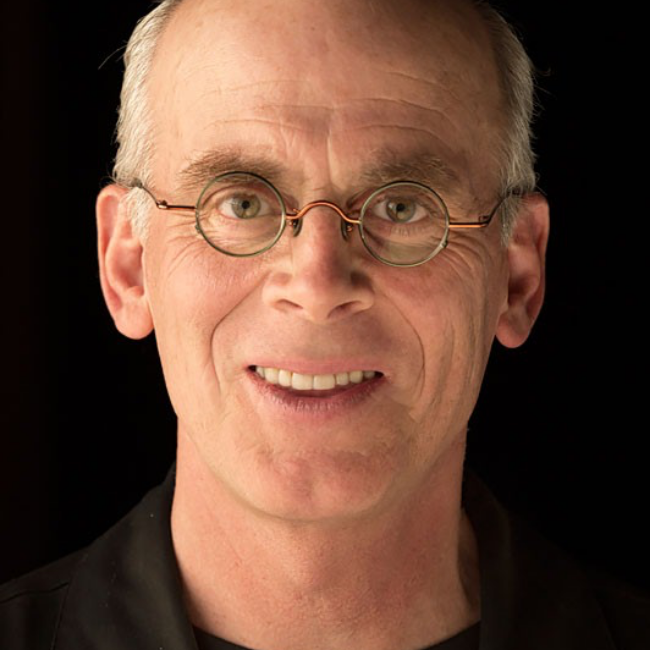
Russell Brown is Adobe's Senior Creative Director and one of the most recognizable teachers in Photoshop's history. For decades he's shown photographers what the software can do, from The Russell Brown Show to his Photoshop World sessions, always with a sense of play that makes the lessons stick. Here he turns that energy on a phone, a single light, and Firefly — proof that the idea matters more than the gear.
What You'll Learn
Skills you'll use on every shoot, with any camera
From a one-light setup to a finished photo illustration — here's what you'll walk away knowing how to do.
Build a one-light iPhone studio
One Westcott continuous light with a grid, a tripod, a V-flat, and an iPhone shooting 48-megapixel raw straight into Lightroom.
Shape a face with a single light
Split, Rembrandt, loop, and butterfly patterns, plus the feathering and V-flat tricks that make one light look like three.
Direct a model toward the picture in your head
Sketch the concept first, coach the expression, and keep the background clean so Firefly has room to work.
Add the light you never set up
A Lightroom preset, radial gradient, and mask that create a background light after the shoot is over.
Build the scene in Photoshop
Generative Fill with Gemini 3 and Nano Banana 3 for rim lights, clawfoot tubs, and hot air balloons, without changing your subject's face or pose.
Write prompts that keep your subject intact
Russell's rules: important elements first, less detail for better results, and the select-all technique that protects the original.
Try Before You Join
Watch another full lesson, free
No signup. No credit card. Press play.
That's two full lessons, free. The rest of the course is ready when you are.
The Full Curriculum
7 lessons, start to finish
Just watched Lesson 3? Here's everything around it — tap any lesson to see what's covered.
Russell sets the ground rules (keep it simple, get it right in camera) and shares self-portraits, performers, and open flame shot with one phone and one light.
Russell's entire kit: one Westcott continuous light, a tripod, a V-flat, and an iPhone shooting 48-megapixel raw, plus why the 2X lens flatters faces.
Split, Rembrandt, loop, and butterfly lighting from a single light, plus the feathering and V-flat tricks that make one light look like three.
Russell sketches three bubble-themed concepts with model and bubbleologist Kirk Marsh, then shoots with the final illustration in mind, directing expressions and keeping backgrounds clean for Firefly.
A bathtub, a rubber ducky, and not a bubble in sight. Russell directs Kirk through an improvised soak under one overhead light, coaching the pose from awkward to believable.
Kirk takes a basket and a telescope into a hot air balloon that doesn't exist yet. Russell directs the awe and makes the case for renting gear instead of buying it.
A background light in Lightroom that was never on set, then Generative Fill in Photoshop with Gemini 3 and Nano Banana 3 to add a rim light, a clawfoot tub, and a hot air balloon without changing Kirk's face or pose. Plus the prompt rules that make it work.
All 7 lessons are streaming right now. Join KelbyOne for just 54¢ a day →
From the Course
See the shoot, then the finish
Loved by Members
You're in good company
Rated 4.8 out of 5 — "Excellent" — across 1,843 reviews on Trustpilot. Here's what members say.
KelbyOne is so inspiring, exhilarating, fascinating and downright exceptional. Every aspect of KelbyOne is like a good novel that you can't put down. Great technical and useful knowledge.
These courses don't treat you like you're an idiot, but still walk you through step by step. Other members really go the extra mile to help you understand and progress as a photographer.
I am soooo pleased that I found this program. I am learning and growing by crazy leaps and bounds in my photography skills. The teaching style makes everything stick.
The classes are well done and I always learn something new. I especially enjoy the no-nonsense approach to teaching. It keeps what could be a dry topic interesting.
More Than One Course
This course is just the beginning
Creative Photo Illustration with an iPhone comes with your KelbyOne membership — and so does everything below. Tap any benefit to see what's included.
The full KelbyOne library covers photography, Lightroom, and Photoshop from first principles to professional technique — portraits, landscape, travel, studio and flash, wedding, sports, street, food, fashion, business, and more. Every course is taught by a working pro, broken into focused lessons you can watch in any order, and available to stream whenever you want. Start a class on your lunch break, finish it that night, and come back to it any time you need a refresher.
KelbyOne releases a new course every single week, so your membership is worth more the longer you hold it. New techniques, new gear, new software releases, and new instructors are added continuously — meaning the latest in photography and post-processing is always waiting for you, and you'll never pay extra for it.
Not sure what to watch next? Curated learning tracks sequence the right courses in the right order so you build skills step by step instead of jumping around. The Photographer's Fast Track is designed to save you years of trial and error, and your progress is tracked along the way so you always know what you've finished and what's next.
Your membership includes a growing toolkit of free Lightroom presets, Photoshop brushes, and other downloadable resources you can put to work right away. Many courses also include downloadable practice files so you can follow along with the exact images the instructor is using — learning by doing, not just watching.
Stream on your computer, phone, tablet, or Apple TV and pick up right where you left off on any device. The KelbyOne app also lets you download classes for offline viewing, so you can keep learning on a plane, a road trip, or anywhere without a connection. Your account works anytime, anywhere.
Learning is easier with people in your corner. KelbyOne members are a welcoming, genuinely helpful community — the kind who go out of their way to answer questions and help you progress. When a technique doesn't click, there's a place to ask, and real photographers at every level who are happy to help.
If you're unhappy for any reason, contact us within the first 30 days of an annual membership (or the first 7 days of a monthly membership) and we'll gladly cancel and issue a full refund. You also get access the moment you join, and you can cancel anytime from your account page. There's nothing to lose by trying it.
Membership
One membership. Everything unlocked.
Creative Photo Illustration with an iPhone and the entire library of courses come with a KelbyOne membership. Go annual and you'll pay just $249 $199 — about 54¢ a day — and save $40 over paying monthly.
Everything included
- This course — Creative Photo Illustration with an iPhone, all 7 lessons
- Full access to all 1,000+ courses
- A new course every week, at no extra cost
- Guided learning tracks & the Photographer's Fast Track
- Free presets, brushes & downloadable practice files
- Watch on desktop, mobile, tablet & Apple TV — even offline
- Friendly, helpful member community
Still on the fence?
Start monthly at $19.99/mo and switch to annual anytime. Heads up: paying month-to-month works out to $239.88 a year — $40 more than going annual.
Backed by a 100% Money-Back Guarantee
Not happy for any reason? Contact us within the first 30 days of an annual membership (or the first 7 days of a monthly membership) and we'll gladly cancel and issue a full refund. You get access the moment you join.
Questions? Answered.
Everything you need to know
Right away. The moment you join, you can sign in and start watching Creative Photo Illustration with an iPhone — and every other course in the library — immediately, on any device.
Yes. KelbyOne has courses for every skill level, taught in plain language, step by step. This course meets you where you are, and the rest of the library grows with you as you improve.
Russell shoots the whole course with an iPhone and one continuous light, and he makes the case for renting rather than buying. The lighting patterns, directing, and Photoshop techniques work with any camera and any single light, so you can follow along with what you own.
Annual is the best value by a wide margin: $199 for a full year (regularly $249) works out to about 54¢ a day and saves you $40 compared to paying month-to-month ($239.88/year). Monthly is there if you'd rather start small — and you can switch to annual anytime.
Yes. Cancel whenever you like from your account page and you'll keep access until your membership period ends. You're also covered by our money-back guarantee — 30 days on annual, 7 days on monthly — so there's no risk in trying it.
Yes. Stream on desktop, mobile, tablet, and Apple TV, and pick up right where you left off on any device. The KelbyOne app also lets you download classes to watch offline — on a plane, a road trip, anywhere.
Of course — KelbyOne has members all over the world. All prices are listed in US dollars (USD), so just keep your local exchange rate in mind at checkout and renewal.
Yes — two complete lessons, in fact. Lesson 1 plays right at the top of this page, and Lesson 3, Move the Light, Change the Face, is free to watch further down. No signup or credit card needed. If you like how Russell teaches, the rest of the course is one membership away.
Your next illustration
starts with your phone.
Join KelbyOne today and stream Creative Photo Illustration with an iPhone — plus 1,000+ more courses from the world's best instructors — with a single membership.
Join KelbyOne & Start Watching$249 $199/year · about 54¢ a day · Money-back guarantee